By the end of this module
- Choose project format and raster from the post plan.
- Link and transcode media without losing source identity.
- Build bins, views, columns, and media storage that support assistant and editor work.
Core knowledge
Principles before controls
Project format affects the whole pipeline
Frame rate, raster, color pipeline, audio sample rate, start timecode, and source formats must align with dailies, editorial, sound, VFX, and conform plans.
Metadata is the path home
Source file, reel, tape, camera, sound roll, timecode, clip name, scene/take, LUT, and transform information allow editorial decisions to reconnect to originals.
Avid media management is deliberate
Managed media, media databases, linked sources, transcodes, project files, attic versions, and exports have different locations and recovery behavior.
Dailies organization encodes production
Bins, views, clip colors, sift criteria, script data, and naming should reflect shoot day, scene, setup, take, and editorial status.
Guided build / approximately 90-120 minutes
Build it in the application
- 1
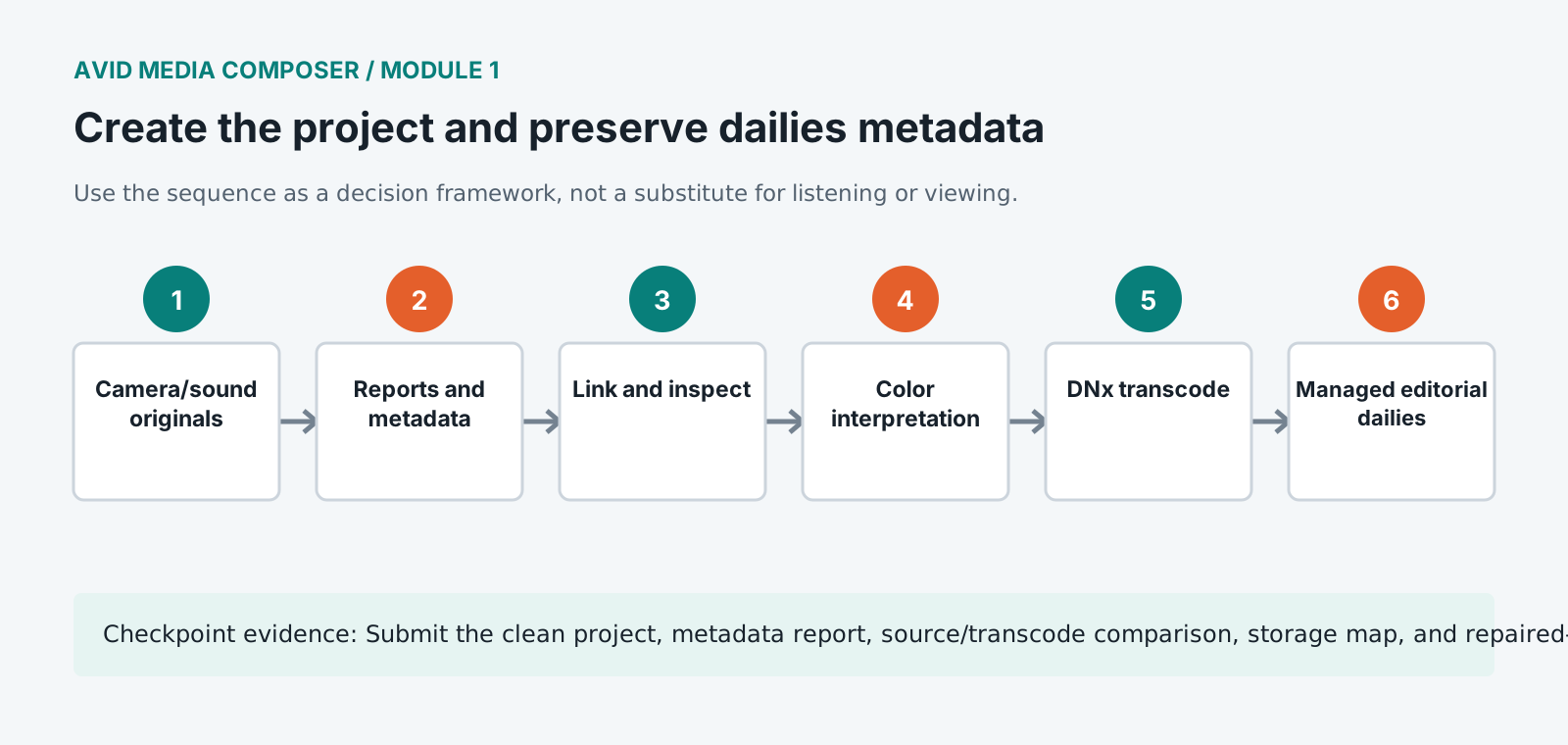
Read the post plan and record camera formats, recording rates, project rate, editorial codec, raster, color transform, audio rate, turnover formats, and archive owner.
- 2
Create the project at the specified format and establish shared settings without overwriting user-specific keyboard preferences.
- 3
Copy the dailies pack into the standard structure and compare camera and sound reports with the file manifest.
- 4
Link one camera card in a source bin, display source metadata columns, and confirm source file, reel, timecode, frame rate, raster, and color values.
- 5
Apply the documented source color transform or viewing LUT without baking an undocumented creative look.
- 6
Transcode to the approved DNx editorial format while preserving source metadata and timecode.
- 7
Confirm generated media appears on the approved media drive and that MediaFiles/database behavior is understood.
- 8
Create bins and custom views for daily rushes, sync, scenes, groups, selects, sequences, VFX, sound, turnovers, and exports.
- 9
Export a metadata report and save a CLEAN_DAILIES project milestone before creative editing.
Independent challenge / 45-60 minutes
Prove the principle
Diagnose clips with duplicate names, missing reel values, wrong source color interpretation, editorial media on the system drive, and one camera rate imported into the wrong project.
Portfolio checkpoint
Evidence to retain
Submit the clean project, metadata report, source/transcode comparison, storage map, and repaired-fault log.
Store this evidence in 01_ADMIN/checkpoints/module-1 and include it in the final decision log.
Failure modes
Diagnose before retrying
Transcodes cannot relink to originals
Compare source file/reel metadata, timecode, frame rate, source path, AMA/link attributes, and any naming changes.
Media is offline after moving systems
Verify managed media path and databases, linked source availability, drive names, permissions, and project media ownership.
Picture looks different after transcode
Review source color space, LUT/transform application, project color settings, bake versus metadata behavior, and display path.
Working vocabulary
Terms you must be able to explain
- dailies
- Prepared production picture and sound made available for review and editorial.
- link
- Reference source media without converting it into Avid managed media.
- transcode
- Create new encoded media while retaining source relationships and metadata.
- reel metadata
- A source identifier used with timecode to reconnect editorial media to camera originals.
Primary sources
Verify current behavior
Lesson reviewed 2026-07-13. Verify menus and shortcuts against the lab release.
Failure in practice
Where this goes wrong
Metadata arrives with the dailies or it does not arrive at all. Scene, take, camera, lens and circled status are captured on set and carried in the file, and a project that ignores those columns at import throws away information nobody will reconstruct later. Mapping them properly at the start is worth an hour.
Decide between linking and transcoding deliberately rather than by default. Linking is immediate and leaves you dependent on the original media staying where it is. Transcoding costs time upfront and produces a self-contained project. On a long-running edit the second usually wins, and finding that out late is expensive.
Spot-check a handful of clips against the camera reports before building anything. Metadata that disagrees with paperwork is easier to correct while the project holds thirty clips than after it holds three thousand.