By the end of this module
- Clean and duplicate the approved sequence for each turnover.
- Export traceable picture and sound interchange packages.
- Test relink/reconform evidence and create a usable archive.
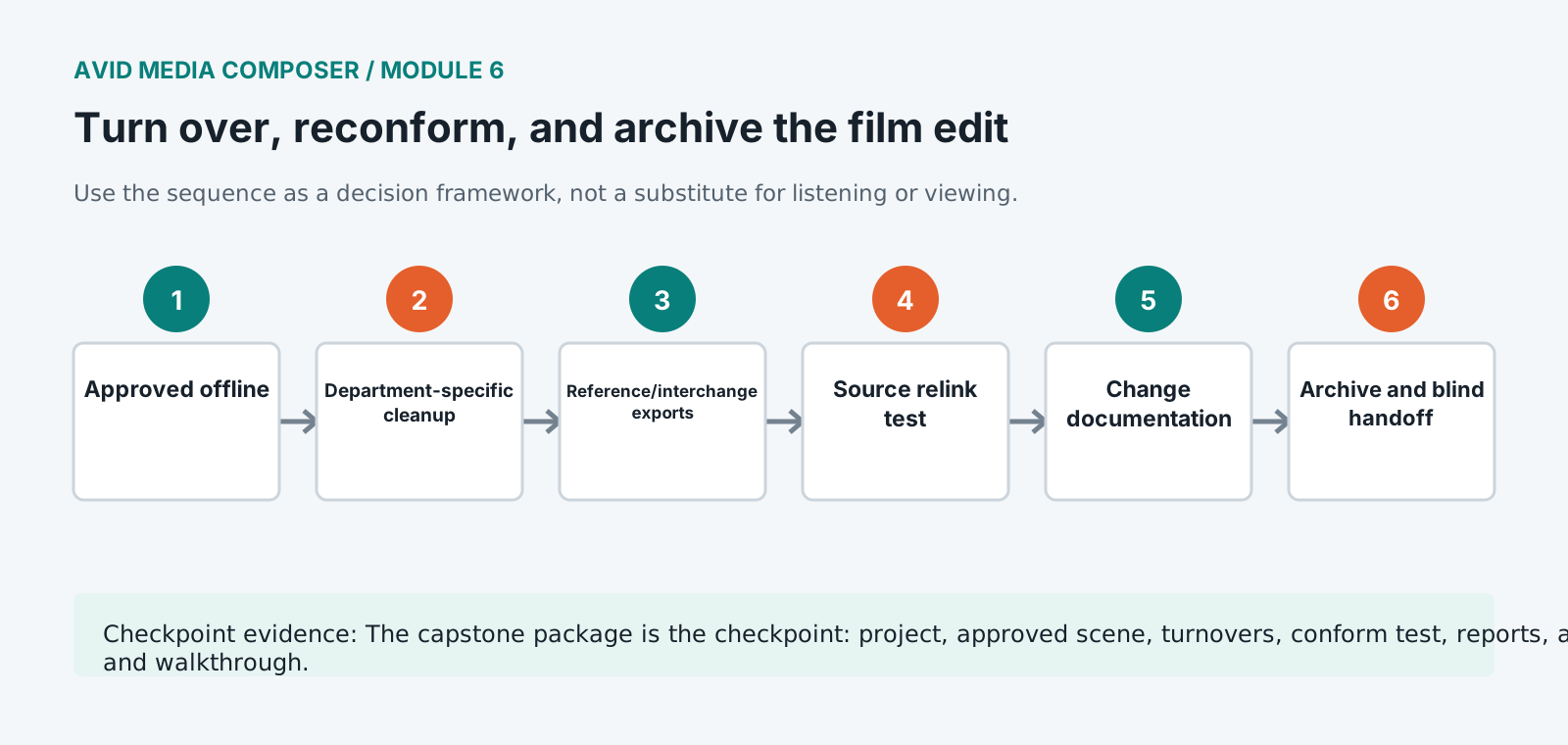
Core knowledge
Principles before controls
Turnovers are department contracts
Picture, sound, VFX, music, grade, and online may need different media, handles, references, metadata, leaders, and change documentation.
Sequence cleanup should not rewrite history
Remove or simplify unsupported temporary structures only in turnover copies, preserving the approved editorial sequence unchanged.
Conform must be tested, not assumed
Relink representative shots to camera originals and compare timecode, framing, speed, effects, color interpretation, and duration.
Archive preserves decisions and provenance
Keep approved sequences, source and editorial metadata, project versions, reports, rights, temp records, turnovers, references, and checksums.
Guided build / approximately 90-120 minutes
Build it in the application
- 1
Lock the approved sequence name, duration, start timecode, picture version, and screening approval record.
- 2
Duplicate dedicated SOUND_TURNOVER, PICTURE_TURNOVER, VFX_TURNOVER, and ARCHIVE sequences.
- 3
Organize and simplify tracks according to each department specification while preserving sync and documenting every change.
- 4
Create picture reference with burn-in identifiers, sequence timecode, source identifiers where required, sync references, and guide audio.
- 5
Export AAF for sound with required handles, track layout, embedded or linked media choice, and reference files.
- 6
Export EDL, AAF, ALE, marker/VFX lists, or other finishing metadata required by the post plan.
- 7
Relink a representative sample of editorial shots to camera originals and compare source identity, timecode, duration, framing, speed, and color interpretation.
- 8
Generate a change list or version note for every alteration after the prior turnover and communicate affected departments.
- 9
Copy project, bins, reports, metadata exports, references, turnovers, rights, checksums, and known issues into the archive and run a blind handoff.
Independent challenge / 45-60 minutes
Prove the principle
Audit a turnover containing an offline title, collapsed multicam metadata, missing source reel, unbaked timewarp, short sound handles, and the wrong picture reference version.
Portfolio checkpoint
Evidence to retain
The capstone package is the checkpoint: project, approved scene, turnovers, conform test, reports, archive, and walkthrough.
Store this evidence in 01_ADMIN/checkpoints/module-6 and include it in the final decision log.
Failure modes
Diagnose before retrying
AAF opens with missing or shifted audio
Check sequence rate, start timecode, sample rate, source media, handles, embedded/linked choice, rendered effects, and export warnings.
Original relink selects the wrong clip
Inspect source file/reel metadata, timecode overlaps, duplicate names, frame rate, source path, and relink matching criteria.
Offline and online framing disagree
Compare source raster, proxy framing, FrameFlex/reformat settings, source transform, stabilization, and effect order.
Working vocabulary
Terms you must be able to explain
- offline edit
- The creative editorial stage, often using proxy or editorial media before final finishing.
- online/conform
- Reconstruction of approved editorial decisions using finishing-quality sources.
- AAF
- An interchange format carrying sequence structure, metadata, and optionally media.
- ALE
- An Avid Log Exchange file used to transfer clip and metadata records.
Primary sources
Verify current behavior
Lesson reviewed 2026-07-13. Verify menus and shortcuts against the lab release.
Failure in practice
Where this goes wrong
Turnover is a translation between systems and translations lose things. An interchange file carries the cuts and rarely carries effects, speed changes or nested sequences intact. Sending a reference video alongside the file, showing exactly what the edit should look like, is what lets the receiving department notice what did not survive.
Reconform is where an unclear version history becomes expensive. Matching a finished edit back to original material depends on knowing precisely which cut is being conformed, and a project with four sequences named variations of final costs somebody a day of detective work. Name the version that goes out and lock it.
Open the turnover on a second machine before sending it. An interchange file that rebuilds correctly somewhere other than where it was made is one that will survive arriving at a facility.