By the end of this module
- Edit MIDI for phrasing rather than visual regularity.
- Record and comp a playable performance.
- Use automation to reinforce form and expression.
Core knowledge
Principles before controls
Expression is multidimensional
Timing, duration, velocity, articulation, controller data, pitch, dynamics, timbre, and space combine into a phrase.
Editing should preserve causality
Correct only what obscures intention. Perfectly aligned notes can sound less coherent than a controlled performance.
Automation belongs to the composition
Filter, level, send, panorama, articulation, and timbral changes can create phrase and form, not merely polish.
Sound design should preserve role
Changing a patch is useful when it improves register, attack, sustain, space, or identity within the arrangement.
Guided build / approximately 90-120 minutes
Build it in the application
- 1
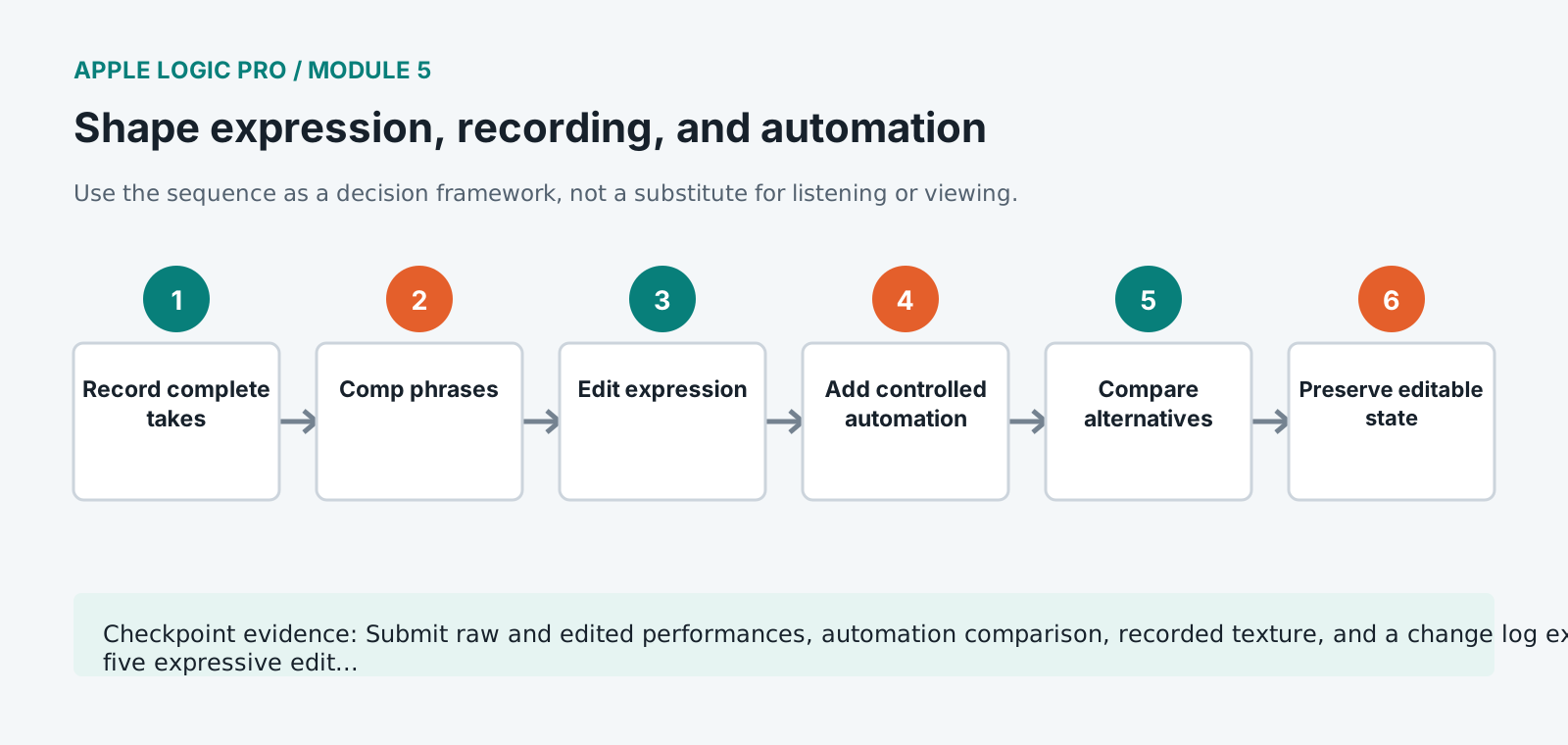
Record one MIDI part in at least three complete takes while monitoring at a comfortable low-latency setting.
- 2
Comp a performance using complete phrases before repairing individual notes.
- 3
Edit note starts, lengths, velocities, and overlaps based on articulation and phrase direction.
- 4
Add expression, modulation, sustain, or articulation data appropriate to the instrument and inspect for abrupt controller jumps.
- 5
Record one audio texture from an approved source and trim, fade, name, and place it nondestructively.
- 6
Automate one formal build using at least two coordinated parameters and one release back to a stable state.
- 7
Use track alternatives or a duplicate project to compare restrained and exaggerated automation at matched level.
- 8
Freeze or bounce a resource-heavy track only after naming the source state and preserving an editable path.
- 9
Conduct a no-screen listening pass and mark any phrase that sounds programmed rather than intended.
Independent challenge / 45-60 minutes
Prove the principle
Humanize one eight-bar passage without randomization. Every timing, dynamic, or articulation change must support phrase direction.
Portfolio checkpoint
Evidence to retain
Submit raw and edited performances, automation comparison, recorded texture, and a change log explaining five expressive edits.
Store this evidence in 01_ADMIN/checkpoints/module-5 and include it in the final decision log.
Failure modes
Diagnose before retrying
MIDI feels uneven after quantization
Inspect note length, velocity, articulation, controller data, and interaction with other parts instead of increasing quantize strength.
Automation jumps at region boundaries
Check breakpoint values immediately before and after the boundary and whether region and track automation are both active.
Recording latency affects performance
Reduce buffer and monitoring load, use direct or low-latency monitoring where available, and verify compensation after recording.
Working vocabulary
Terms you must be able to explain
- controller data
- MIDI messages that shape parameters such as modulation, expression, sustain, or timbre.
- articulation
- The manner in which a note begins, sustains, and ends.
- track alternative
- An alternate track state used to compare performances or edits.
- freeze
- A temporary render used to reduce processing demand while preserving the option to restore editing.
Primary sources
Verify current behavior
Lesson reviewed 2026-07-13. Verify menus and shortcuts against the lab release.
Failure in practice
Where this goes wrong
Uniform velocity is the fastest way to make a good part sound programmed. Real players vary attack constantly, and sampled instruments frequently switch samples at velocity thresholds, so a flat velocity line also means the same recording repeating. Varying it changes both dynamics and timbre at once.
Automation written while listening to a section in isolation rarely survives the full piece. Levels that felt right on their own turn out wrong in context, because the surrounding material changes what the ear expects. Write automation passes against the whole arrangement rather than section by section.
Compare an automated section against its flat version directly. If the difference is hard to hear, the moves are too small to justify the complexity, and if it is jarring they are too large.
Recorded parts and programmed parts need different automation treatment. A performance already contains dynamics, so writing more on top frequently fights it, while a programmed part contains none and needs the shape written in deliberately.