By the end of this module
- Design scenes with compatible and contrasting clip combinations.
- Perform and capture a Session sequence.
- Convert performance evidence into a readable Arrangement.
Core knowledge
Principles before controls
Scenes are hypotheses
A scene tests which clips coexist at one moment. It is not automatically a complete song section.
Performance reveals transition timing
Launching, muting, filtering, and scene changes expose how long material needs to establish and when contrast becomes meaningful.
Arrangement preserves and edits a choice
Recording Session activity creates a linear record that can be shortened, extended, repaired, and automated.
Follow actions need boundaries
Generative behavior is useful when its possible outcomes support the section and when important transitions remain controllable.
Guided build / approximately 90-120 minutes
Build it in the application
- 1
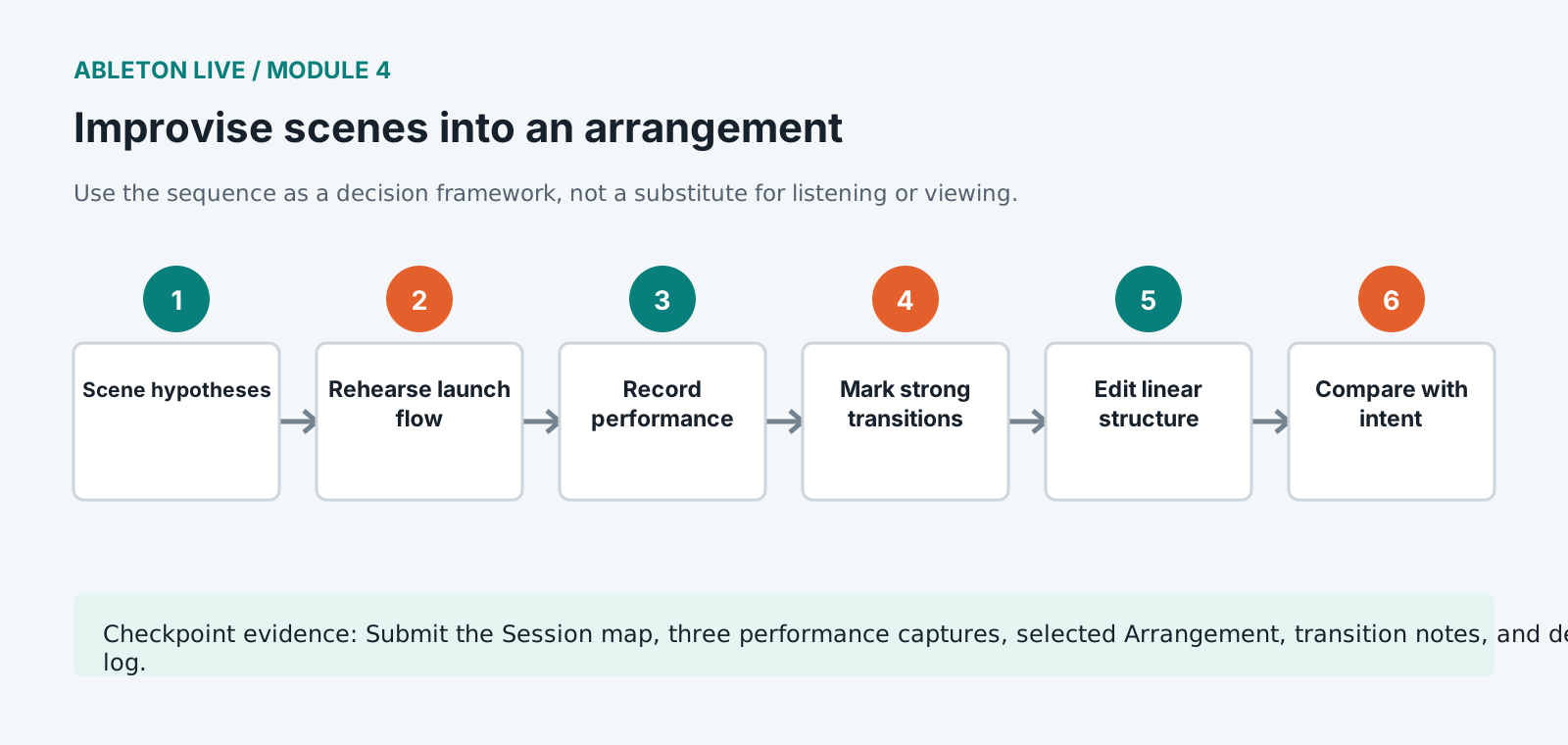
Complete scenes for opening, groove, expansion, breakdown, climax, and release with deliberate empty slots.
- 2
Set clip launch quantization and start behavior according to rhythmic function rather than using one setting for every clip.
- 3
Create one controlled follow-action group for secondary texture and test its possible states over multiple passes.
- 4
Rehearse a five-minute scene performance using clip launches, track activators, sends, macros, and one resampled transition.
- 5
Record the performance into Arrangement View from a clean start, preserving the unedited capture as a milestone.
- 6
Use Back to Arrangement and mark successful spontaneous transitions before editing.
- 7
Remove accidental waiting, repair late launches, and retain expressive timing that supports the groove.
- 8
Consolidate clear section regions and add locators without flattening clips needed for later editing.
- 9
Compare the final arrangement against the original Session map and explain every structural departure.
Independent challenge / 45-60 minutes
Prove the principle
Record three complete performances from the same scenes. Build the arrangement from the strongest continuous performance and no more than three repairs from alternates.
Portfolio checkpoint
Evidence to retain
Submit the Session map, three performance captures, selected Arrangement, transition notes, and decision log.
Store this evidence in 01_ADMIN/checkpoints/module-4 and include it in the final decision log.
Failure modes
Diagnose before retrying
Arrangement keeps returning to Session clips
Stop or deactivate Session clips and use Back to Arrangement only when the linear timeline should regain control.
Transitions happen late
Review global and clip quantization, launch timing, scene preparation, and whether the performance gesture anticipates the boundary.
Follow actions create incoherent combinations
Limit the source group, probabilities, and allowed transitions. Keep formal anchors outside the generative system.
Working vocabulary
Terms you must be able to explain
- Arrangement Override
- The state in which Session activity replaces corresponding Arrangement playback.
- follow action
- A rule that launches another clip after defined conditions.
- locator
- A named position in Arrangement View used for navigation and structure.
- consolidate
- Create a new continuous clip from a selected timeline range.
Primary sources
Verify current behavior
Lesson reviewed 2026-07-13. Verify menus and shortcuts against the lab release.
Failure in practice
Where this goes wrong
Recording a session performance into the arrangement captures the clip launches and not the energy of playing them. What felt responsive live frequently sounds mechanical laid flat, because the timing that made it work was a response to what you were hearing. Expect to edit afterwards rather than treating the capture as finished.
Commit to an arrangement earlier than feels comfortable. Session view rewards open-ended experimenting, which is why projects stall there indefinitely. Laying even a rough structure along the timeline turns a collection of ideas into something with a beginning and an end, and that is the point where a track starts becoming finishable.
Listen to the arrangement once without touching anything. Sitting through it as a listener rather than an editor is the only way to notice a section that outstays its welcome, and it is a different activity from working on it.