Teacher professional learning
Teaching High-School Media Production From Scratch
Prepare and run a safe, inclusive, project-based media unit when you are new to production technology.
Completed outcome
Teach the first unit
A complete six-to-twelve-week unit, teacher-made micro-production, and classroom readiness pack.
What students will learn
- Explain the development-to-delivery lifecycle in student-friendly language.
- Choose achievable outcomes for available time, equipment, and student needs.
- Establish age-appropriate consent, privacy, rights, safety, accessibility, and AI expectations.
- Organize crews, diagnose failures, assess individuals fairly, and run a final handoff.
Equipment and prerequisites
- Tier A: phone or tablet, headphones, basic computer, free editor, classroom space.
- Tier B: two cameras, tripods, portable recorder, microphones, basic lights, editing computers.
- Tier C: studio, switcher, intercom, graphics/playout, shared storage, and technical support.
- General classroom experience and a school-approved safeguarding route.
- No production software experience is required.
- Local policy, permission, risk, publication, and retention decisions must be reviewed by the institution.
Required once before any student production course
Production Readiness: Make Media Safely and Hand It Off
A shared orientation for high-school students covering audience, consent, rights, safety, accessibility, roles, files, versions, and handoff before a production begins.
- Translate an idea into an audience promise and observable success criteria.
- Identify consent, privacy, rights, safety, accessibility, and publication decisions before recording.
- Create a folder, naming, version, backup, and handoff system another student can navigate.
- Participate in a respectful crew with a clear role, communication path, and stop-work authority.
Teaching media production, stage by stage
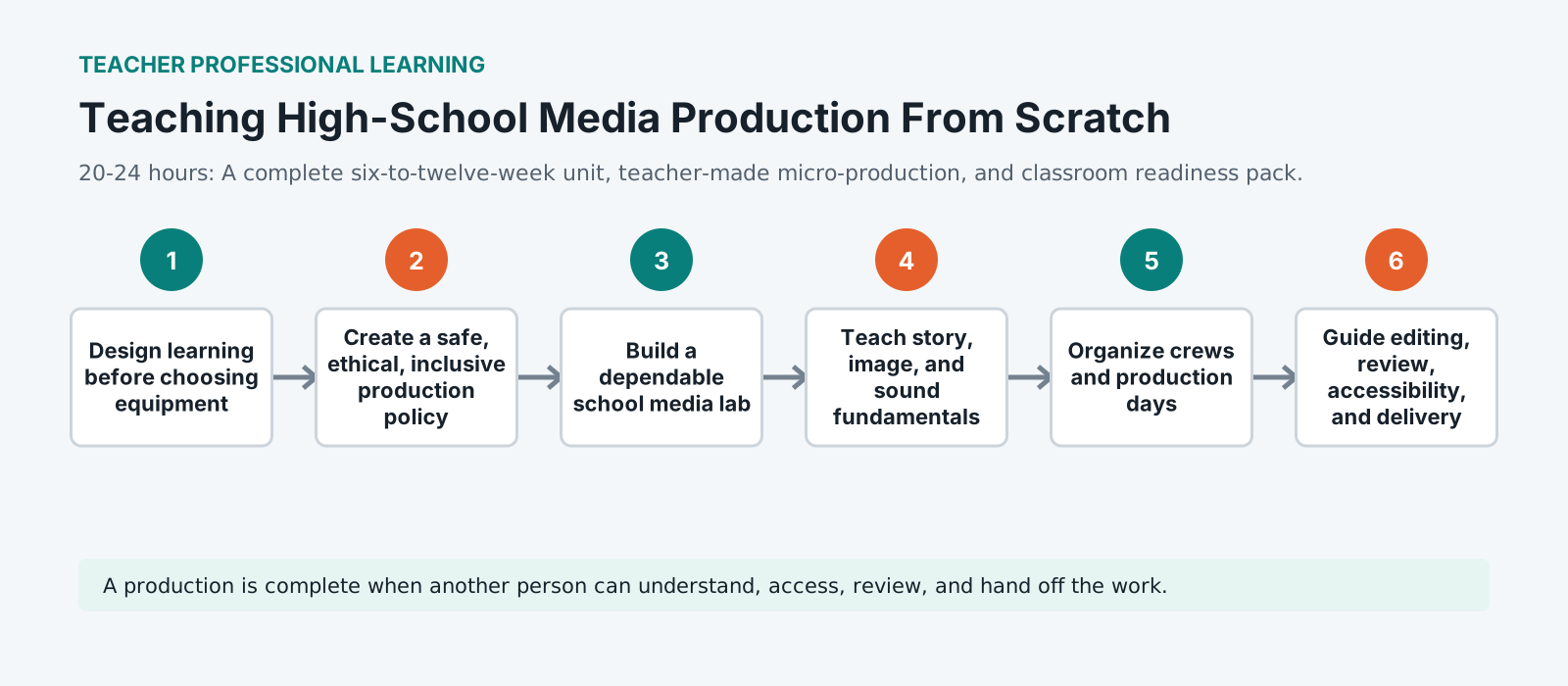
Design the learning before choosing equipment
Equipment is the most visible decision and the least important one. Decide what students should be able to do by the end and what evidence would show it, then buy the cheapest thing that supports that. A class that can plan, record clean sound and finish a piece on phones beats a class that owns cameras nobody can operate.
A safe, ethical and inclusive policy
Write the rules down before the first shoot: who may be filmed and how consent is recorded, what happens to footage afterwards, what is off limits, and how a student says no. A policy settled in advance protects the student who is uncomfortable and the teacher who has to make a decision quickly.
Build a dependable lab
Dependable beats impressive. Kit that charges in a known place, files that land somewhere predictable, and a naming convention everyone follows. Most lost lessons are lost to a flat battery, a missing cable or a project nobody can find, and every one of those is a systems problem rather than a skills one.
Teach story, image and sound fundamentals
Fundamentals transfer and software does not. Why a shot is framed where it is, why a cut happens on a movement, why the microphone goes close. Teach those against whatever tools you have, and students can pick up the next application on their own.
Organise crews and production days
Named roles that rotate. On a crew where everybody is vaguely responsible for sound, nobody is checking the levels, and the problem surfaces in the edit. Rotating roles across projects means every student has done every job, which is also what makes them tolerant of each other's.
Editing, review, accessibility and delivery
Build in a review point before the work is finished, so feedback can still change something. Treat captions and readable text as part of finished rather than as a bonus, and give the class a real delivery specification to hit. Constraints teach more than freedom does.
Assess individuals fairly inside team projects
Group work hides both the student who carried it and the one who did not. Assess the process as well as the artefact: planning documents, role logs, versions, a short account of what each person decided. That makes the grade defensible and the learning visible.
Rehearse and defend the unit
Run the whole unit yourself before the students do, at the speed they will have. It is the only way to find the lesson that needs two periods, the export that takes an hour, and the step that assumes an account nobody has. Then be able to say what the unit teaches and how you know.
Standardized practice pack
Teacher launch pack
scheme of work, lesson plans, equipment inventory, room plan, production agreement, permission planning sheet, risk starter, role cards, call sheet, rundown, critique protocol, rubric, QC checklist Keep institutional policy and student data outside the public practice pack.
Rights and media boundary: the generated coursework defines required fixtures and evidence. Large media should be institution-distributed with rights, consent, checksum, and retention records.
Portfolio assessment
Capstone: Teach the first unit
Design and defend a practical high-school media unit, then prove the workflow with a short teacher-made production and its access and QC package.
Submit
- Scheme of work and lesson sequence
- Student brief and delivery specification
- Tier A and Tier B room/equipment plan
- Consent, rights, privacy, safety, accessibility, and AI decision sheets
- Teacher-made micro-production with captions or transcript
- Assessment rubric, contribution log, fallback lesson, and walkthrough
Constraints
- The first pilot must work with Tier A equipment.
- Students must have meaningful off-camera, non-speaking, technical, editorial, and access roles.
- Public release is optional and requires local approval. Private delivery is the default.
| Criterion | Weight | Strong evidence | Revision needed |
|---|---|---|---|
| Audience, story, and editorial judgment | 20 | Clear purpose, appropriate choices, evidence-led revisions | Purpose or audience is unclear or unsupported |
| Planning, communication, and teamwork | 15 | Roles, schedule, handoffs, and contribution are visible | Work depends on undocumented individual effort |
| Creative and technical craft | 20 | Intentional image, sound, writing, editing, design, or operation | Choices are accidental or technically uncontrolled |
| Reliability, organization, and problem solving | 15 | Files, tests, recovery, revision, and delivery are dependable | The project cannot be opened, checked, or recovered |
| Ethics, rights, safety, and accessibility | 15 | People and audiences are respected throughout the workflow | Permissions, safety, access, or representation are incomplete |
| Delivery, reflection, and career evidence | 15 | Final package, QC, walkthrough, and next-skill plan are clear | The student cannot explain or hand off the work |
Career connection
See where these roles lead
Connect this work to producer and educator and one adjacent role. Ask students what evidence would let a supervisor trust the work. Connect this work to teacher, producer, and safeguarding lead and one adjacent role. Ask students what evidence would let a supervisor trust the work. Connect this work to media technician and production coordinator and one adjacent role. Ask students what evidence would let a supervisor trust the work.
Explore media careersSource base
References and review
- W3C: Making Audio and Video Media Accessible
- UNESCO: Media and Information Literacy
- UNESCO: AI Competency Framework for Teachers
- Creative Commons educator licensing portal
- ScreenSkills career maps
- UNESCO: Media and Information Literacy for Teachers
Curriculum reviewed 2026-07-13. Local school policy and current platform behavior must be checked before delivery.
Vocabulary
Consent Agreement from somebody appearing in a recording, covering what it is for and where it will be shown. Obtained before recording rather than after, because a person declining afterwards leaves material that cannot be used.
Rotating roles Assigning named production jobs that change between projects, so every student performs each role across a course. It prevents the pattern where one student always edits and another always holds the microphone.
Process evidence The planning documents, role logs, version history and written decisions that show how a finished piece was made. It is what allows an individual to be assessed fairly inside a group project.
Handoff Passing a project to somebody else so they can continue it without explanation. The practical test of whether file naming, versions and notes are genuinely organised or merely familiar to the person who made them.