Student production lifecycle
How Live Broadcast Works
Plan, rehearse, operate, recover, record, and review a private live or as-live programme with a complete crew workflow.
Completed outcome
Live or as-live programme
A privately distributed twelve-to-twenty-minute live or as-live magazine, news, performance, debate, sport analysis, or school-event programme.
What students will learn
- Explain how editorial, production, camera, audio, graphics, communications, engineering, and delivery interact in real time.
- Build a timed rundown, crew plan, signal map, preflight, access plan, and contingency plan.
- Rehearse and recover from realistic technical, editorial, contributor, and network failures.
- Produce and sign off a private live or as-live programme with individual role evidence.
Equipment and prerequisites
- Tier A: two phones/tablets, headphones, basic editor, local recording, and a private rehearsal.
- Tier B: two cameras, tripods, audio mixer/recorder, wired communications, graphics/playback, local network.
- Tier C: studio, switcher, intercom, tally, confidence monitoring, encoder, recorder, and technical support.
- Complete Production Readiness orientation.
- Use private or local distribution by default. Public streaming requires separate school approval and moderation.
- No unsupervised public contributors, public chat, dangerous rigging, or untested network exposure.
Required once before any student production course
Production Readiness: Make Media Safely and Hand It Off
A shared orientation for high-school students covering audience, consent, rights, safety, accessibility, roles, files, versions, and handoff before a production begins.
- Translate an idea into an audience promise and observable success criteria.
- Identify consent, privacy, rights, safety, accessibility, and publication decisions before recording.
- Create a folder, naming, version, backup, and handoff system another student can navigate.
- Participate in a respectful crew with a clear role, communication path, and stop-work authority.
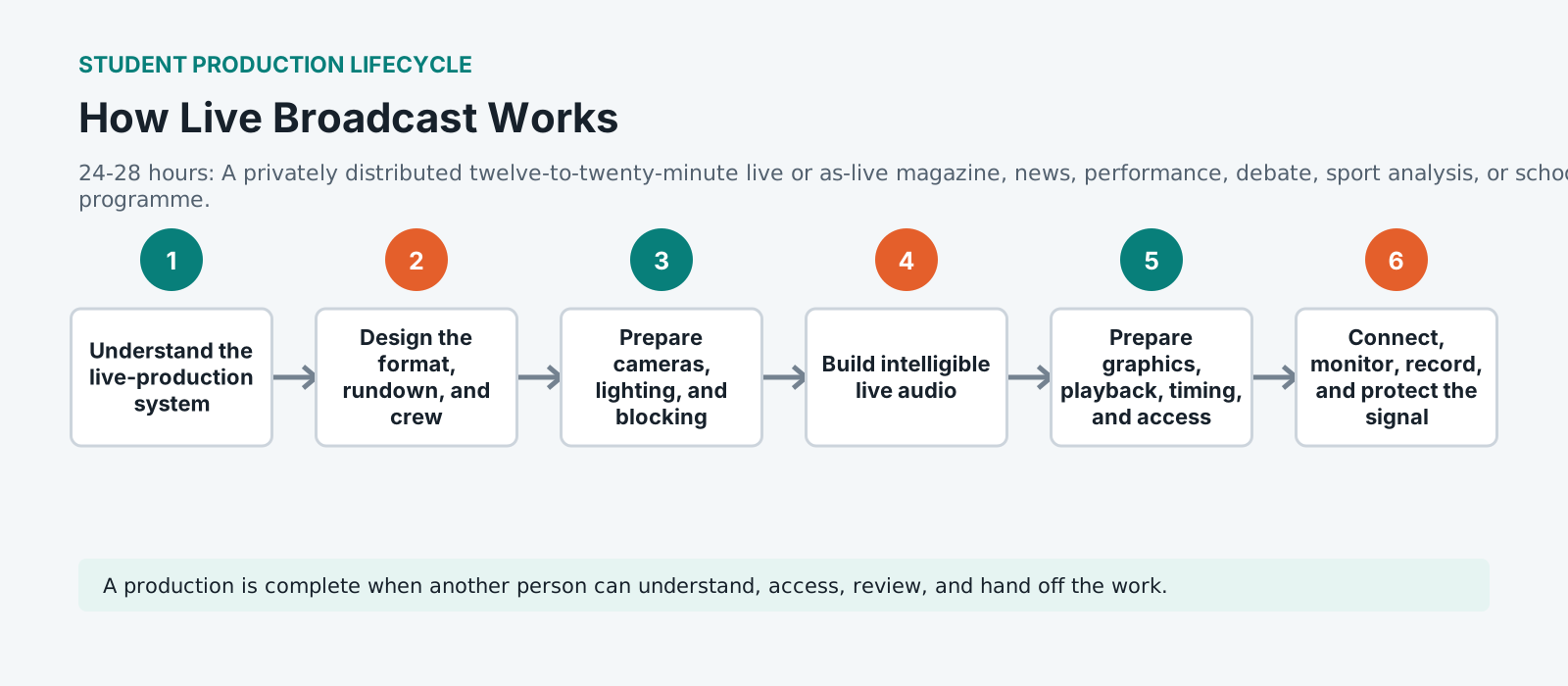
How live broadcast works, stage by stage
The live-production system
Live is a system, not a set of jobs. Cameras, sound, graphics, playback, transmission and the people directing them are one machine with no undo. Understanding the whole chain is what lets somebody in one seat recognise that the problem is upstream, which is most of what makes a live gallery work.
Format, rundown and crew
The rundown is the script of a live programme: what happens, in what order, how long each item runs, and who is responsible. It exists so that a change made in the tenth minute is visible to everybody at once. Crew the show to the rundown, not the other way round.
Cameras, lighting and blocking
Blocking decides what a director can actually cut between. Every position needs a shot that matches the others in exposure and colour, and lighting that works for all of them at once rather than for each in turn. Check the cuts in rehearsal, because a mismatch that is obvious in a switch is invisible on a single monitor.
Intelligible live audio
Audio is where live programmes are lost. Intelligibility beats richness: a voice that can be understood over a domestic television with the dishwasher running is the target. Ride the levels, watch for open microphones, and build a mix that survives a caller, an outside source and an unexpected round of applause.
Graphics, playback, timing and access
Everything pre-prepared has to be findable under pressure. Name files so a panicking operator finds the right one, check every name and spelling before transmission, and treat captions and access provision as part of the rundown rather than an addition to it.
Connect, monitor, record and protect
Know what your signal path is, where it is monitored, and what happens if each link fails. Record locally as well as sending: the safest recording is the one that does not travel. Confidence monitoring at the far end is the only way to know what the audience is receiving rather than what you are sending.
Rehearse failure
Rehearse the failures, not the show. What happens when a camera dies, a guest does not appear, a playback file will not roll. Live crews are not judged on the run that went well. They are judged on the recovery, and a recovery that has been practised takes seconds instead of a minute of silence.
Produce, sign off and review
Somebody has to hold editorial responsibility in the moment and afterwards. Sign-off means a named person accepted what went out. The review that follows is where a team gets better: what happened, what was nearly a problem, and what changes before the next one.
Standardized practice pack
Live broadcast classroom pack
fictional live brief, segment scripts, camera cards, graphics, clips, music, timing data, contributor changes, fault cards, incident report, accessibility and QC fixtures Institution distributes large video and audio media through its licensed storage or learning system.
Rights and media boundary: the generated coursework defines required fixtures and evidence. Large media should be institution-distributed with rights, consent, checksum, and retention records.
Portfolio assessment
Capstone: Live or as-live programme
Produce a timed programme in which every role, signal, recovery path, access decision, and final record can be reviewed after the event.
Submit
- Format, rundown, crew, and communications plan
- Camera, audio, graphics, clip, and access plan
- Full system map and preflight evidence
- Two failure rehearsals and incident log
- Twelve-to-twenty-minute live or as-live programme
- Captions/transcript, QC, archive, and individual reflection
Constraints
- The default audience is the classroom or approved school network.
- A stop, hold, fill, and emergency communication path must be tested before the final run.
- Every student must have a meaningful role that can be performed off-camera if needed.
| Criterion | Weight | Strong evidence | Revision needed |
|---|---|---|---|
| Audience, story, and editorial judgment | 20 | Clear purpose, appropriate choices, evidence-led revisions | Purpose or audience is unclear or unsupported |
| Planning, communication, and teamwork | 15 | Roles, schedule, handoffs, and contribution are visible | Work depends on undocumented individual effort |
| Creative and technical craft | 20 | Intentional image, sound, writing, editing, design, or operation | Choices are accidental or technically uncontrolled |
| Reliability, organization, and problem solving | 15 | Files, tests, recovery, revision, and delivery are dependable | The project cannot be opened, checked, or recovered |
| Ethics, rights, safety, and accessibility | 15 | People and audiences are respected throughout the workflow | Permissions, safety, access, or representation are incomplete |
| Delivery, reflection, and career evidence | 15 | Final package, QC, walkthrough, and next-skill plan are clear | The student cannot explain or hand off the work |
Career connection
See where these roles lead
Connect this work to director and technical producer and one adjacent role. Ask students what evidence would let a supervisor trust the work. Connect this work to producer, director, and floor manager and one adjacent role. Ask students what evidence would let a supervisor trust the work. Connect this work to camera operator, vision supervisor, and lighting operator and one adjacent role. Ask students what evidence would let a supervisor trust the work.
Explore media careersSource base
References and review
- W3C: Making Audio and Video Media Accessible
- UNESCO: Media and Information Literacy
- UNESCO: AI Competency Framework for Teachers
- Creative Commons educator licensing portal
- ScreenSkills career maps
- SMPTE ST 2110 overview
- BLS: Broadcast, Sound, and Video Technicians
Curriculum reviewed 2026-07-13. Local school policy and current platform behavior must be checked before delivery.
Vocabulary
Rundown The running document of a live programme, listing every item, its duration and who is responsible. It is the single shared source of truth, so that a change made during transmission reaches everyone at the same moment.
Confidence monitoring Checking the signal as it arrives at its destination rather than as it leaves the gallery. It is the only way to know what an audience is actually receiving, since a fault downstream is invisible at the source.
Stop-work authority The right of anybody on a crew to halt production if something looks unsafe, regardless of role or seniority. Stated in advance, because people only use it when they know for certain that they have it.
Intelligibility Whether speech can be understood, as distinct from whether it sounds pleasant. It is the governing measure for live audio, because a broadcast that cannot be followed on a domestic television has failed whatever else it achieved.